
Digital TV Software
A 2004 APC Magazine roundup of four Windows programs for watching and recording digital television in Australia, reproduced from the Word file as it was sent to the magazine, editorial scaffolding and all.
This is a software roundup I wrote for APC in July 2004, comparing four Windows programs for watching and recording digital television in Australia. It is reproduced from the Word manuscript, which is the file as it left my hands rather than the magazine’s page.
It ran, and my own paperwork has since answered what memory lost: the invoice I sent APC nine days after the deadline is made out “For: Articles for APC magazine September 2004 issue”. So it was the September 2004 issue. No copy of the printed page survives in my files, so the date above is the day the manuscript was finished, and the file below is the closest thing to the article that exists.
Because it is a submission and not a printed page, it still carries everything a writer sends and a subeditor takes out: a “Story Summary” for the commissioning editor, a running word count after each section, bare “Verdict” numbers waiting to be set as stars, //Picture: …// markers where the art should go, and a cross-reference to a companion tutorial that reads “page XX” because nobody had laid the issue out yet. All of that is reproduced. It is the most interesting thing about the file.
The four //Picture:// markers have been replaced by the screenshots they name, each with the manuscript’s own caption set beneath it. The review blocks were already two-column tables in the Word file and are kept as tables, except for the Pro and Con rows: each of those held a bulleted list inside a single cell, and they are set out as lists beneath the table instead. Filenames and commands are set in code style, which the manuscript did not distinguish. Word’s HYPERLINK field codes are gone and their addresses kept. Nothing else has been touched: the prose below is what was delivered.
The screenshots were sent as separate BMP files and are published here as PNG, pixel for pixel identical to the originals. Two of them date themselves, which is a pleasing thing for a source to do: the ShowShifter and myHTPC windows both carry an on-screen clock reading Sunday 11 July 2004, at 12:47 and 12:41 in the afternoon, and the manuscript was last saved at 12:38 that same afternoon, three minutes before the myHTPC shot was taken.
Four faults are left standing as they were written. The opening sentence of the Introduction runs two sentences together, because the clause that ended the first one was cut and its full stop went with it. The picture caption under ProgDVB is DigitalWatch’s, repeated word for word. And the “Online” address in the myHTPC block is DigitalWatch’s as well; myHTPC’s own site was myhtpc.net.
Two expansions are also simply wrong. BDA is Microsoft’s Broadcast Driver Architecture, not “Broadcast Digital Architecture”, and the DVB table called EIT is the Event Information Table, not the “extra information table”. The claim that second one is attached to is sound enough, since Australian broadcasters were sending only present and following events at the time. All of these are mine from 2004 rather than damage in conversion, so they stand.
An earlier draft of the same piece survives, finished three days before this one, and the comparison is worth a paragraph. It is 1,291 words against 2,107. Only ShowShifter had a Pro and Con list; the other three were plain prose with no contact details, no price and no verdict. The first person is still in it: “I tested that version” here becomes “this was the version tested”, and “we examine” becomes “APC examines”. Most tellingly, the earlier ProgDVB entry is 45 words long and says the program “appears to only support viewing and not recording”. By this draft it runs to 224 words, records in several formats and does teletext. Somebody had gone back and actually used it.
And what the earlier draft calls “What to look for” is not writing at all. It is the commissioning editor’s brief, pasted in and still addressed to me: “So you’ll have to look through the enthusiast discussion forums for solutions and write about how viable they are.” In this draft it has become the reader’s checklist that closes the piece. The word counts give it away. Every section in both drafts carries one, except that section in the earlier draft, because it was not yet my copy to count.
The brief itself has since surfaced in my backups, and it confirms the deduction word for word: its fourth question carries the very line quoted above about the enthusiast forums. It is APC’s commissioning sheet of the 2nd of July 2004, authored by Garth Montgomery with Dan Warne as the contact — and the contact block has its own fossil, a mailto link whose visible text reads dwarne@apcmag.com while its address still points at gmontgomery@apcmag.com. It commissioned “Digital TV software – 2 pages” at 1,300 words for AUD$400, deadline Sunday the 10th of July at 6pm, with the TwinHan VisionPlus DVB-T on loan and to be returned the Monday after, APC organising the pickup. It asked for a magazine that “is objective, challenging and strives for a wry and irreverent tone”, and its terms include a financial penalty of ten per cent of the fee per day for late work. Both briefs from the batch are archived below.
Between the brief and the first draft sits the research, and it survives too: a single Word file begun the weekend the briefs arrived, 11,767 words of the commissioned products’ websites and forum pages pasted end to end, titled “http://www” by its own first clipping. It is not reproduced or archived here — it is other people’s pages — but it is the stage of the journey the drafts grew out of.
A third file turned up after this article was first published, and it is APC’s own edit. Dan Warne saved it at half past five on the afternoon of the 11th of July 2004, three hours after I finished the draft below, working on a Mac where I had been on Windows. He cut the copy from about 1,820 words to about 1,410, and marked the whole closing boxout for removal with a line typed straight into the file: “Extra text – we won’t have room to include this.” Counting the boxout, roughly a third of what I sent did not survive. He also fixed two of the three faults named above, rewriting the Introduction’s run-on opening and correcting myHTPC’s address to www.meedio.com. He did not catch ProgDVB’s caption, which still repeats DigitalWatch’s word for word.
His version also carries a byline that appears in neither of my drafts: “Christine Tham and Iain Waugh have found five of the best.” So the magazine credited a second author, and set the byline as Christine where the conference programmes of the period all say Chris — though my own hand did the same that weekend, in the remote controls manuscript’s standfirst. It also says five, and only four programs are reviewed. The brief answers what the file could not: five reviews were commissioned, and the fifth was MythTV on Linux, which is in neither of my drafts — the roundup was Windows-only from its first version. The standfirst was written from the brief, not from the copy. Note that even this edit is not the printed page: it still carries “Price: To come” and a cross-reference to “page xx”. It is the edit, not the issue, and I still cannot tell you which issue ran it.
Download the manuscript (DOC, 82 KB) · Download the earlier draft (DOC, 48 KB) · Download APC’s edit (DOC, 49 KB) · Download the brief (DOC, 120 KB)
Story Summary
APC reviews software capable of scheduling, recording and playing-back Digital TV in Australia. We investigate which have the best HTPC menu systems for other multimedia applications like picture slideshows and music playback, but also consider ease of set up and technical reliability.
Introduction
The market for Digital TV tuner cards is rapidly maturing the price of these cards are dropping to the level where digital TV tuner cards are now cheaper than analogue cards with hardware MPEG2 encoding/decoding, and deliver much better picture quality as they capture MPEG2 digitally “off the air” without analogue “artefacts” such as ghosting or noise.
Digital TV capable software are also maturing, but more slowly. Many manufacturers have implemented proprietary drivers for their cards, and often buyers have no alternatives other than the bundled software that came with the cards.
Microsoft has been promoting Broadcast Digital Architecture (BDA) as an emerging standard for TV tuner card drivers. To date, few cards have BDA drivers (and some of these are user-contributed rather than vendor-supported) because there is only one “application” that uses BDA: Microsoft’s Windows XP Media Center Edition (which is only sold with a pre-built PC). However, third party BDA-aware applications are finally coming out.
In the open source/Linux community, the LinuxTV DVB project is now part of the “production” Linux 2.6.x release. It currently supports mainly the Technotrend DVB-T PCI card (sold in Australia under the Hauppauge and DPANDA brand names), although more recently support has been added for Nebula DigiTV, Avermedia DVB-T and a few other cards not sold in Australia.
In this article, APC examines currently available “third party” Digital TV capable software (ie. software not bundled with the hardware). All software have been tested with the TwinHan VisionPlus DVB cards, using either the manufacturer supplied driver or the user-contributed BDA driver.
The ability to support downloadable Electronic Program Guides (EPG) is an issue, and none of the software featured will support Australian EPG downloads “out of the box.” There are no “official”/supported downloadable source of EPG data in Australia, unlike in the US and Europe where there are a number of such providers. Although Digital TV broadcasts contain EPG information in the broadcast EIT (extra information table) embedded in the transport stream, it’s limited to “Now” and “Next” programme information. The other option is download a utility such as tv_grab_au, TVHarvest, NebulaEPG, etc. These utilities convert information from public websites into a format (such as XMLTV) that can be used by the Digital TV software. Hopefully, the situation will improve in the near future.
Word count: 380
Showshifter DVB
| Showshifter DVB | |
|---|---|
| Contact | Mark Harwood, New Magic |
| Online | http://www.showshifter.com |
| Phone | (02) 9528-4555 |
| Price | Showshifter DVB US$59.99. Other versions (do not support Digital TV): Showshifter Version 3 US$59.99, Showshifter Version 3 Pro US$74.99 |
| Intended market | All-in-one Media Centre |
| Verdict | 4.0 |
Pro
- Nicest looking user interface optimized for TV resolutions
- Includes additional functionality (DVD/video/music playback, picture viewer)
- Can be used across network
- Extensible via plug-in modules
- EPG support via import of XMLTV listings
Con
- Only supports Hauppauge/DPANDA cards
- Beta version has a few problems and crashed at least once
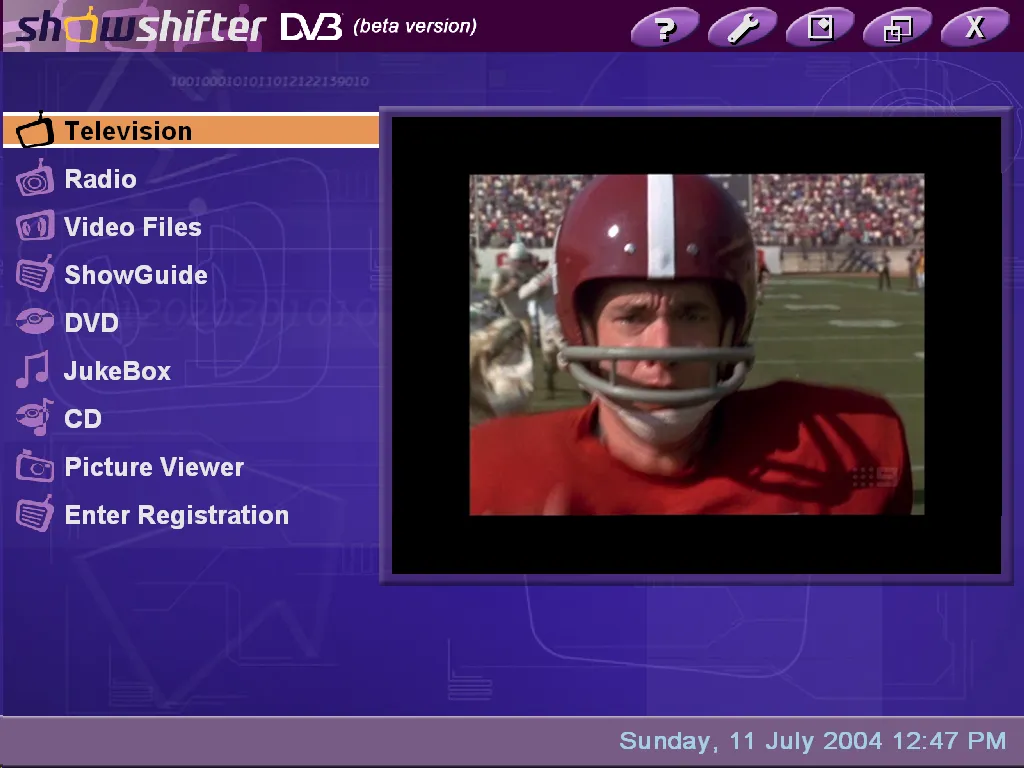
Showshifter DVB: lots of functionality in a visually appealing user interface suitable for TV resolutions
Want the “ultimate home media centre?”
Showshifter supports not just the usual DVR features like pausing live TV and time-shift recordings, but also works as a DVD/multimedia player, picture viewer, music jukebox for a complete turnkey solution. It even supports operation over a network and can be operated using a supported remote control.
Earlier versions of Showshifter only supported analogue TV tuner cards, but there is now a new version called Showshifter DVB, with support limited to the Technotrend/Hauppauge/DPANDA DVB-T PCI/USB tuners. (It has support for Nebula DigiTV, but “not Australia.”) There is a beta version (3.02.2595) of Showshifter DVB that is BDA-aware, so this was the version tested using the Spectrum BDA drivers for the VisionPlus card.
EPG support is enabled through a utility called HMNXMLTV that can import XMLTV listings into its internal EPG called “ShowGuide.” It is extensible through plug-in modules and the user interface is skinnable.
The installation process was very user friendly and straightforward, and the channel tuning process found all available digital TV channels.
Showshifter has the most visually attractive and easy to use interface, with all functions in large font and easy to read at TV resolutions. The beta version appeared to have a few bugs and the application crashed at least once.
http://home.swiftdsl.com.au/
Word count: 210
myHTPC with DABDig plug-in
| myHTPC with DABDig plug-in | |
|---|---|
| Contact | Pablo Pissanetzky, Meedio LLC |
| Online | http://home.bigblue.net.au/mulin77/DigitalWatch/ |
| Phone | Email: info@meedio.com |
| Price | Free (for personal, non-commercial use) |
| Intended market | Front end menu interface integrated with EPG and TV scheduling functionality |
| Verdict | 4.5 |
The “Online” address is DigitalWatch’s, repeated from the entry below. myHTPC’s own site was myhtpc.net.
Pro
- Attractive user interface
- XMLTV compatible EPG viewer
- Integrated scheduling of TV recordings via EPG viewer, plus support for recurrent recordings
- Can front end any Digital TV application
- Includes additional functionality (DVD/video/music playback, picture viewer)
- Extensible via plug-in modules
Con
- Does not have in-built Digital TV watching and viewing, but will front-end the application bundled with your TV tuner card
- Difficult to configure
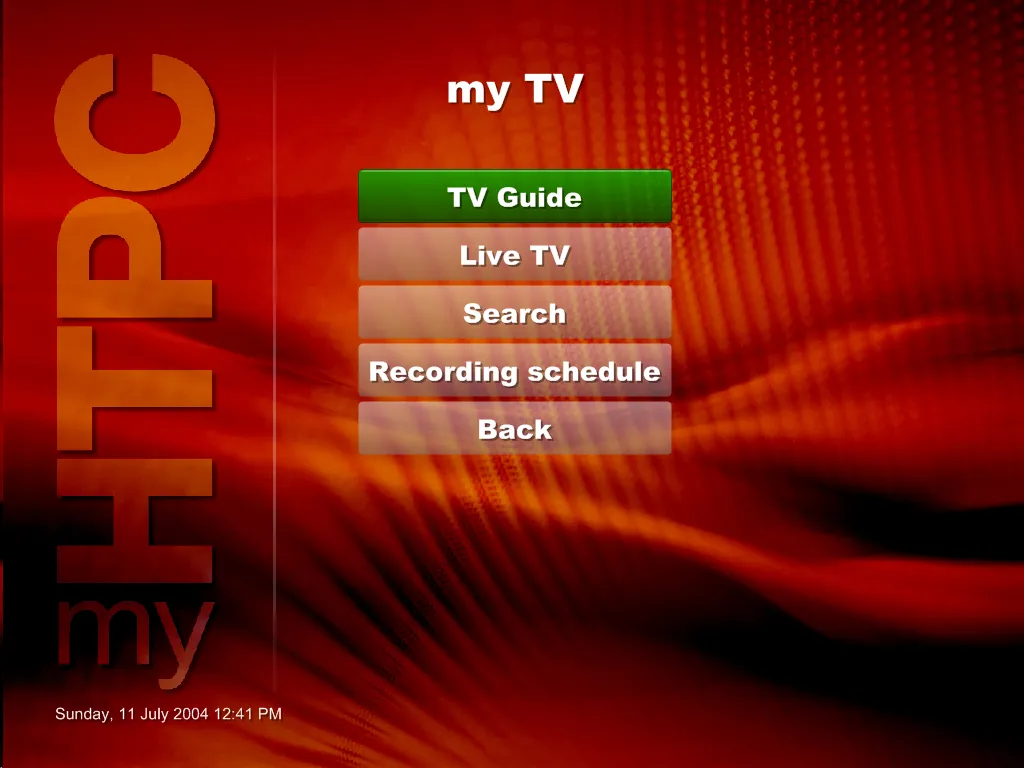
myHTPC: a very nice-looking front end with integrated EPG and TV scheduling capabilities
Want an attractive front-end for your HTPC that supports an Australian EPG and point-and-click scheduling of TV programmes?
myHTPC (current version Alpha Release 24) is strictly speaking not a Digital TV application, but it is Digital TV “aware” through “plug-ins.” myHTPC is actually a customisable, menu-driven HTPC front end that, according to the author, allows you to “to launch external programs, browse pictures and large collections of almost any type of media stored on your computer.”
The DABDig plug-in integrates myHTPC to a Digital TV application of your choice, such as the bundled software that comes with your card through a freeware program called DABDig (current version 2.50b14). DABDig supports a large number of both analog and digital TV tuner cards, including the TwinHan VisionPlus, Nebula DigiTV, Hauppauge Nova-T, DPANDA DVB-T and the AVerMedia AVerTV DVB-T.
myHTPC with the DABDig plug-in has an EPG (sourced from XMLTV listing files) to allow you to browse TV listings. It will also allow you to schedule TV recordings (including recurring recordings).
The author of myHTPC is currently working on releasing a commercial version called Meedio Essentials, that hopefully will be released by the time you read this. There will also be version called Meedio TV that supports Live TV and DVR capabilities.
Integrating myHTPC with DABDig and your favourite DVR application is fairly complex (see the APC tutorial on page XX) but the software appears to work seamlessly and the user interface is very attractive and optimized for TV resolutions.
Word count: 247
DigitalWatch 0.701
| DigitalWatch 0.701 | |
|---|---|
| Contact | “nate” |
| Online | http://home.bigblue.net.au/mulin77/DigitalWatch/ |
| Phone | N/A |
| Price | Free (open source) |
| Intended market | Oriented towards advanced users mainly interesting in watching Digital TV rather than recording. Has a minimalistic user interface and is fully configurable allowing user selection of decoding filters. |
| Verdict | 2.5 |
Pro
- Minimalistic user interface, no clutter
- Has zoom feature
- Fully user customizable and configurable
- Allows user selection of software decoding filters
Con
- No EPG or scheduling TV recordings (but can be integrated with DVB TV Web Scheduler, another open source application)
- No playback of TV recordings
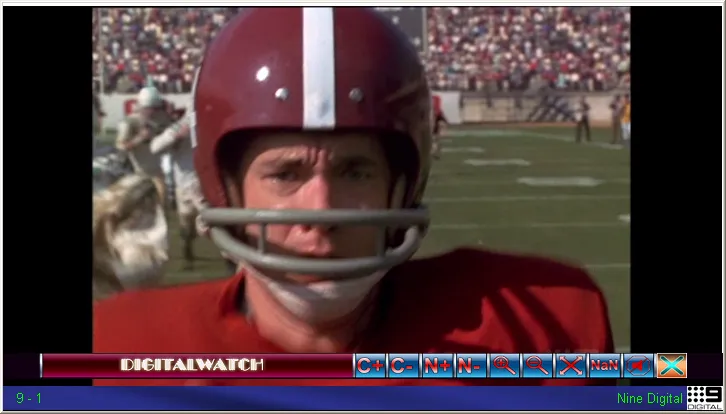
DigitalWatch: a minimalist user interface that is primarily oriented for watching TV
Tired of cluttered and complicated user interfaces and just want a minimalist application for watching TV?
DigitalWatch is a free, open-source, Digital TV viewing and recording application. The current version (0.701) only supports the TwinHan VisionPlus PCI card, but there is a BDA version (0.722) in beta.
The author says that DigitalWatch is “oriented towards watching rather than recording although it does have recording capabilities” and recommends another tool called DVB TV Web Scheduler (BDA version also in development) for timed recordings.
The installation process is fairly manual and very few instructions are provided. TV channel scanning is done using an external utility and then manually entered into the channels.ini configuration file. The web site says channel configuration files for “most capital cities” are supplied, but we did not find them in the installation package.
The biggest drawcard for DigitalWatch is probably the ability to pick and choose the audio and video decoders of your choice, which allows tinkerers to experiment to see which ones have the best quality and stability. It also supports a screen zoom feature, which is useful for watching widescreen programs on a 4x3 display, or watching 4x3 programs on a widescreen display.
Some of the features such as Now and Next and channel strength/quality indicator did not work on the version tested.
The user interface is designed to appeal to users who want to watch TV without any screen clutter. Moving the mouse to the bottom of the frame will bring up a menu bar, but the software is designed to be best used through the keyboard or remote control.
Word Count: 265
ProgDVB
| ProgDVB | |
|---|---|
| Contact | “Prog” |
| Online | http://www.progdvb.com |
| Phone | Email: prog@progdvb.com |
| Price | Free |
| Intended market | Free alternative to the bundled application that came with your Digital TV tuner card |
| Verdict | 3.5 |
Pro
- Nice user interface - good balance between functionality and usability
- Supports Teletext
- Supports multiple formats for TV recording
- Allows user configuration and selection of software decoding filters
Con
- Still in development
- Subtitles did not work
- No downloadable EPG support for Australia
- No support for BDA (yet)
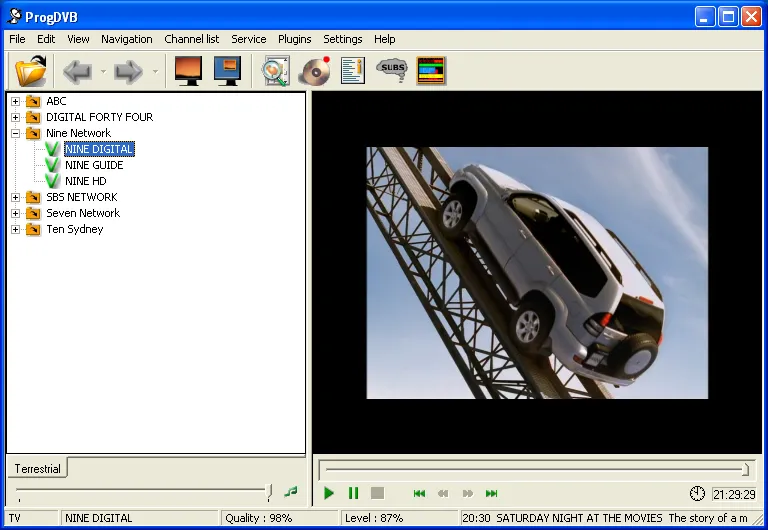
DigitalWatch: a minimalist user interface that is primarily oriented for watching TV
That caption is DigitalWatch’s, repeated word for word. The picture is ProgDVB, which is the least minimal of the four.
Want a free but functional alternative to the bundled application that came with your tuner card?
The current version of ProgDVB (4.40.2 test) supports the TwinHan VisionPlus and Technotrend/Hauppauge/DPANDA cards, plus a number of other cards not sold in Australia. It supports both watching and recording Digital TV, and is extensible through user-contributed plug-ins.
Installation was relatively easy, but the TV channel scanning function (Channel List | Channel Search | Search All Transponders) did not find any channels. However, if a scan is performed individually for each TV station frequency, the program managed to detect and lock in to all channels successfully. In addition, the software allows users to pick and choose various decoding filter configurations, which allows tinkerers to experiment to see which ones have the best quality and stability.
The EPG feature is limited to Now and Next information. There is an additional EPG plug-in available (EPG-plugin from Relict Marauder) but this does not appear to support XMLTV. ProgDVB appears to support multiple recording formats, but recommends PVA (“Packetized Audio and Video PES”).
The Teletext feature appears to work, but subtitles didn’t. ProgDVB has a nice balance between features and usability. Even though the software is still under development, it shows a lot of promise and is worth considering as an alternative to the bundled application that came with your tuner card.
Word Count: 224
Boxout: What to look for
If you are looking at Digital TV software, you may want to consider the following:
EPG support – Does the software support Now and Next information? Does it support downloadable EPG listings for Australia? Can it import XMLTV format EPG listings?
Extensibility – Does it support plug-ins? What plug-ins are currently available? What other functionality does it support besides watching and recording TV?
Hardware support – Is the software supported on your card? If it isn’t, time to look elsewhere, or ask the company/author if they are planning support in the near future.
Installation – How easy/automated is the software installation process? Are the instructions easy to follow? Is the configuration done through a menu/wizard or do you need to edit configuration files?
HDTV – Does it support HDTV channels or only SDTV channels? Does it support Dolby Digital (AC3) audio streams?
Recording format – Does it support HDTV recordings? What format does it record to (PVA, transport stream, program stream) and can the format be converted to program stream for DVD burning? Does it have DVD burning capabilities?
Timeshifting – Can you pause Live TV? Can you schedule recordings? Using an EPG? Can it schedule recurring/repeating recordings? Is there an external/remote interface (API or web) for scheduling recordings?
TV channel scanning – Did the software tune Australian channels easily? Are there any pre-configured channel files for your location?
Usability – Is the software easy to use? Does it support a remote control? Does the user interface get in the way when you just want to watch TV? Is the user interface readable at TV resolutions?
Word count: 266
Sources
- The manuscript,
Digital TV Software v2.doc, 82 KB, created at 9:17 on the morning of the 11th of July 2004 and last saved at 12:38 that afternoon, at revision 25 and 2,107 words, after two hours and twenty-seven minutes of recorded editing. Its stored timestamps are in UTC, which the screenshots confirm: the clock visible in the myHTPC window reads 12:41 pm, and the file it was saved as is stamped 12:41 by the machine that wrote it. Its embedded title reads “Workshop: setting up MyHTPC with DabDig on your PC”, which belongs to a different document it was copied from and not to this one, and it carries a “last printed” stamp of the 6th of July that predates its own creation for the same reason. - The earlier draft,
Digital TV Software.doc, 48 KB, finished on the 8th of July at revision 19 and 1,291 words. The source for everything the preface says about what changed between them. - APC’s edit,
Digital TV Software v3.doc, 49 KB, at revision 28, last saved by Dan Warne at 05:32 UTC on the 11th of July 2004, which is half past three that afternoon in Sydney. Its creation stamp is identical to the manuscript’s, so it is that file carried forward rather than a separate one, and it was worked on under Mac Word 11 where the manuscript was Windows. The source for the byline, the cut boxout and the two repairs, all quoted above from an uncapped re-extraction. Word’s own count in the file reads 1,407 against the manuscript’s 2,107; the figures given above are measured from the text instead, because the same counter differed by 86 words between two files whose text was later shown to be identical. - The briefs,
BRIEF - Home theatre software.doc, 120 KB, andBRIEF - Windows MyHTPC workshop.doc, 117 KB, both created on the 2nd of July 2004 and saved the next day, authored by Garth Montgomery and last saved by Dan Warne, in Mac Word 11 against a code page that says the editors were on Macintoshes while I was on Windows. The first commissioned the roundup at 1,300 words for AUD$400; the second commissioned the workshop at 1,400 words for AUD$500, same deadline, same loan card. The quotations in the preface are from the first. - The companion tutorial,
MyHTPC Workshop.doc, from the 5th of July, is what the myHTPC entry points at with “see the APC tutorial on page XX”. The copy filed alongside the screenshots breaks off mid-document under a heading reading “XMLTV” with nothing beneath it — but three later versions survive in my backups, and the last of them, finished on the 11th of July, runs on through the XMLTV section into a closing boxout on burning recordings to DVD whose picture markers name the three DVD screenshots that sat unexplained beside the others. It is complete, and it is now reproduced as The ultimate Windows HTPC. - The screenshots were delivered as four zipped BMP files,
ShowShifter.bmp,myHTPC.bmp,DigitalWatch.bmpandProgDVB.bmp, alongside ten more belonging to other commissions. They are published here as PNG with their pixels unchanged. - Broadcast Driver Architecture, Microsoft, for what BDA actually stands for.
- EN 300 468, the DVB service information standard, for the Event Information Table and its present/following form.
- The invoice,
APC001.doc, my tax invoice to APC dated the 20th of July 2004, made out “For: Articles for APC magazine September 2004 issue” — the only place the issue is named. It bills three lines: the myHTPC/DABDig Workshop at 1,400 words for $500, “Digital TV Software on test” at 1,100 words for $334 — below the brief’s $400, at the word count the edit left — and the HTPC Remote control article/tutorial at 750 words for $250, $1,084 in all, no GST. It is described here and deliberately not archived: it carries a home address and a bank account, which the web does not need. - The research file,
HT Digital TV software.doc, 935 KB, begun on the 4th of July 2004 and saved once more the next morning: the products’ own web pages pasted into one document, kept as evidence of the journey and not archived, because its words are not mine. - Remote controls for your HTPC, the third piece of the same batch, finished the same afternoon.