
Remote controls for your HTPC
The third piece of my July 2004 APC batch, a Girder and TIRA tutorial with two boxouts, reproduced from the manuscript as it left my hands — with the draft's self-written brief and what changed between the two versions on the way to the deadline.
This is the third piece of the batch I wrote for APC in July 2004, alongside the digital TV software roundup and a myHTPC workshop: a tutorial on controlling a home theatre PC with any infra-red remote, Girder and a TIRA receiver, with two boxouts. It is reproduced from the Word manuscript as it left my hands on the 11th of July 2004 — the same Sunday afternoon I finished the roundup, with the same 6pm deadline hanging over both. The invoice that closed the batch bills this piece too — “HTPC Remote control article/tutorial”, 750 words, $250, for the September 2004 issue, under terms that paid on publication — but no printed page survives in my files, so the manuscript is the record.
The other two pieces have APC’s commissioning briefs, dated the 2nd of July in Garth Montgomery’s hand with Dan Warne as the contact. This one has no brief in anything that survives. Instead, the earlier draft opens with a Story Summary I wrote myself, in the briefs’ own house format: “APC reviews various devices to allow you to control your home theatre PC from the comfort of your sofa. We compare them in terms of practicality, usability, functionality and their ‘cool factor’ – the ability to impress visiting friends and relatives.” Whether the pitch came before the commission or the summary was simply how I organised myself, the files do not say.
Two versions survive, both mine, and the journey between them is the story. The file was created on the 8th of July by cloning the workshop’s document — its embedded title still reads “Workshop: setting up MyHTPC with DabDig on your PC” — and the first version was finished on the 9th, the second on the 11th. Between them the title changed from “Options for Remote Controlling your Home Theatre PC” to “Remote controls for your HTPC”; the Story Summary and an Introduction listing four advantages of a remote (ending with “Your spouse and/or kids may object to having to use a keyboard to watch their favourite TV programs”) were dropped; the four labelled options were recast as flowing prose and gained products and prices — ATI’s All In Wonder 2 RF, NoviiRemote for Palm, Girder at $US20, IRA/TIRA at $35 and $88, Irman at $55; the tutorial tightened from 769 words to 763; and the second boxout was retitled from “What to look for” to “buying advice”. The version reproduced below is the second, the one that went to APC; the first is archived beside it.
The four screenshots were sent as separate zipped BMP files, dated the 9th of July — the day the first draft was finished — and are published here as PNG, pixel for pixel identical, each with the manuscript’s own caption set beneath it. The manuscript names the fourth “GirdefFig4.bmp”, a typo both versions carry. And the fourth screenshot holds a slip that is not mine: the imported Windows Media Player command group lists “Lauch WMP”, misspelt by its own author, while my prose says “Launch”. One more thing the standfirst records: the byline reads Christine, and this time it is in my own hand — in the roundup it was the editor’s addition.
Word’s HYPERLINK field codes are gone and their addresses kept, filenames and commands are set in code style, and the running word counts after each section are reproduced — they were there for the editor, and they are part of what a submission looks like. One fault stands as written, in both versions: the third caption reads “this would normally by COM3”, by for be.
Download the manuscript (DOC, 44 KB) · Download the earlier version (DOC, 44 KB)
Remote controls for your HTPC
If you’re sick of being tethered to your HTPC’s keyboards and mouse, consider setting up a remote control. Christine Tham explains the options and how to configure them.
The biggest difficulty in finding a remote control for your HTPC is that there are too many options to consider! Some people will advocate using an infra-red keyboard and a “learning” universal remote control to mimic the infra-red signals of pressing certain keys on the keyboard. But it’s an inflexible solution since different software may use different keys to perform similar functions. (eg. Different applications may use “P”, “Enter” or “Space” for the “Play” function.)
Another option is to use the remote control bundled with your TV tuner card or DVD player. Generally, this works OK provided you only ever use the application(s) in the package that the remote control was bundled in.
A good option that’s a recent development is a specially designed HTPC remote control. These include helpful functions like an inbuilt joystick which provides mouse-pointer control and generally come with software pre-configured to work with select home theatre PC applications. Some, like ATI’s All In Wonder 2 RF, even use radio-frequency so you don’t have to have a line of sight to your home theatre PC to use them.
You may even find your PDA or mobile phone can be setup to act as a remote using Bluetooth or infra-red. NetRemote (www.netremote.org) is an application that allows your Windows Mobile PDA to act as a remote control for your PC, and NoviiRemote (www.novii.tv) is a good one for Palm OS users.
The most flexible option is using PC control/automation software, which you can train to convert the signals of any remote into an action you specify. The $US20 ($AU27) Girder software is the most popular and generic solution. Couple this with an infra-red receiver like IRA/TIRA ($35/$88 from www.xhome.com.au) or Irman ($55 from www.hometheatrepc.com.au) and you’ll have a very flexible solution.
Setting up Girder and TIRA
This tutorial will show you how you can use any infra red remote control to control your HTPC using Girder and TIRA. TIRA is a bi-directional (sending and receiving) USB infra red adapter. Although TIRA is more expensive than its receiving-only little brother IRA, it has the advantage that it can be used to control other infra-red capable devices like a Foxtel set-top box.
First of all, install TIRA’s device driver from the CD and then plug it in. A licensed copy of Girder comes with the TIRA installation CD; install it. Finally, copy the Girder plug-in for TIRA by copying Tira.dll from the GirderPlugin directory on the Installation CD into C:\Program Files\girder32\plugins.
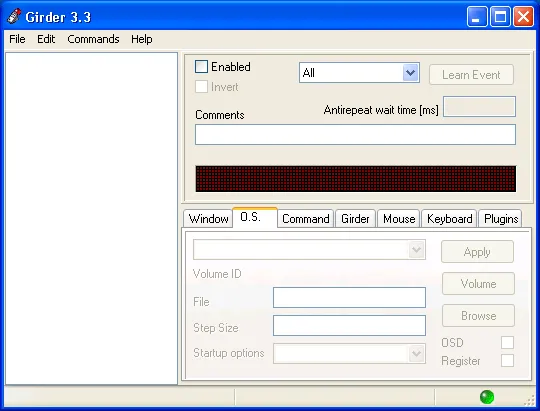
The main Girder screen: It looks intimidating, but it’s actually quite easy to use …
To configure Girder to use TIRA, select the File | Settings … menu item, and in the dialog box, make sure you have checked the Home Electronics Ira/Tira device from the list as well as checked the Auto Enable Input device checkbox.
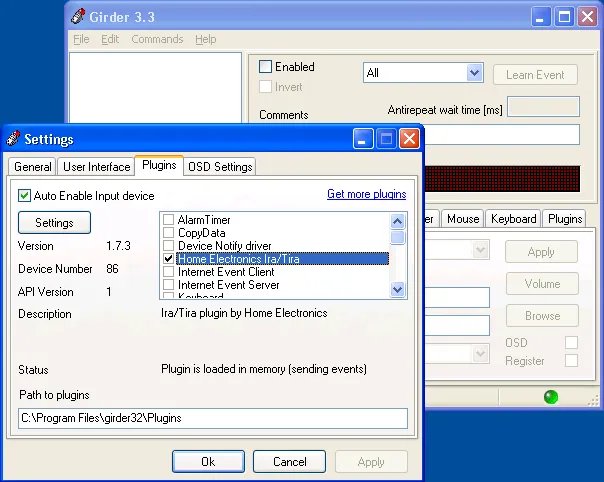
Enabling the TIRA device: Girder allows you to have multiple input devices.
Now click on the Settings button and make sure the right COM port is assigned to the TIRA device. You can determine the correct COM port by going into Device Manager and checking the COM port assigned to USB Serial Port.
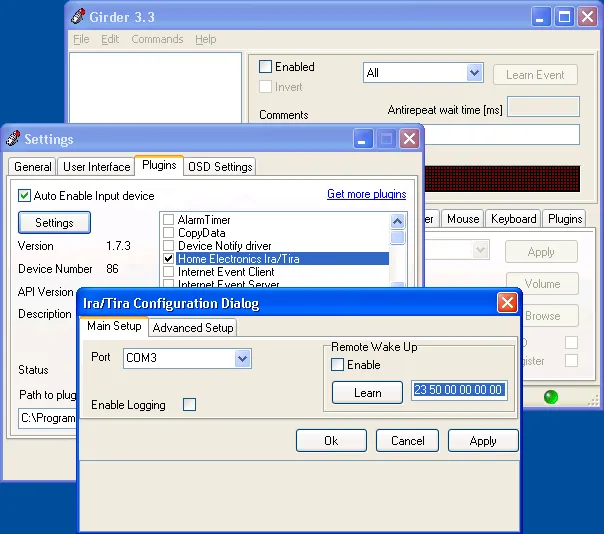
Assigning a COM port to TIRA: For a typical PC, this would normally by COM3.
You can download configuration files for the applications you use from the “Exported Groups” section of the Girder web page (www.girder.nl/exportgr.php). For the tutorial, we will use the Windows Media Player 9.0 exported group dated February 17 2003 written by Mark Mathews. The filename is WMP9w_skins.zip. Unzip the contents. From Girder, select File | Import Group … and select WMP 9 w.skins.GML.
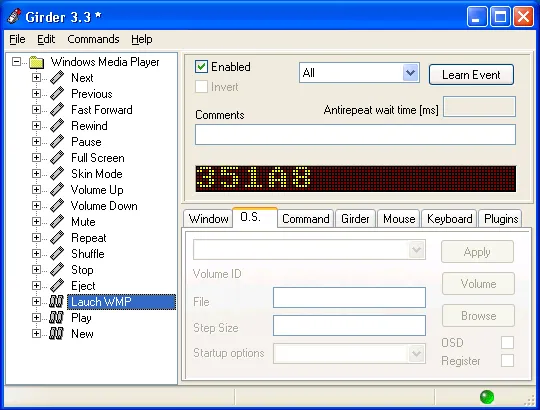
Windows Media Player command set: You can assign any button to any action …
To assign a remote control button to any item in the list of available commands, click the item (for example Launch WMP), then press the Learn button and now press the button you want on your remote whilst it is pointing towards the TIRA device. Girder will assign an “Event String” that corresponds to the remote code to the item. From now on, whenever you press that button, Girder will launch Windows Media Player.
Girder has many more functions, including the ability to learn remote codes associated with your other devices and then controlling them by sending those codes out via TIRA. With some effort, you can automate many actions and assign them to buttons on your remote.
Word count: 763
Sidebar/boxout – HTPC remotes
These are some of the HTPC remote controls currently available in Australia, where to buy them, and some comments on their features:
ATI Remote Wonder (www.auspcmarket.com.au) – Also bundled with some ATI video cards, this is a wireless remote that can also work as a mouse. The bundled software is okay, but using it with Girder or max10 will provide more functionality and extensibility.
iMon RSC and MM (www.auspcmarket.com.au) – The Remote Stick Controller (RSC) is primarily marketed as a mouse replacement and the buttons are targeted for normal PC usage. The Multi-media (MM) version has better support for HTPC applications but does not work as a mouse. Both are infra red remotes with accompanying USB IR transceivers.
Marmitek/X10 MouseRemote (www.eon3.com.au) – This is one of the first mouse/remotes on the market and still one of the best. It supports wireless communication to the PC, but will also control your X10 devices wirelessly (if you have a X10 transceiver) and also can control your other devices via infra-red. The bundled software is fairly basic but the open source version (called max10) is very powerful. There are now several newer models but with less functionality.
Streamzap (www.dpanda.com.au) – This is an infra red mouse/remote control with 35 buttons. The bundled software supports a number of common applications but is not very extensible.
Word count: 221
Boxout – buying advice
Here are some features you may want to consider when choosing which remote control option is right for you:
Applications supported – Will it support the applications you have installed or are planning to use?
Extensibility/Programmability – Can you reprogram any keys to make the remote cater for any applications that it does not support “out of the box?”
Macro capability – Can the remote execute not just one function but a related set of functions when you press one button?
Mouse support – Can you use the remote as a hand held mouse?
Number and labelling of buttons – Does the remote have buttons that correspond to common functions in your applications?
Usability – Does the remote “feel right”? Not too big or small? Are the buttons easy to distinguish in the dark and clearly labelled?
Wireless vs Infra red – A wireless remote does not require a line of sight between the remote and the PC (helpful when the PC is tucked away in a corner or in a different room). An infra-red remote may potentially also work as a “universal remote control” for other devices in your living room.
Word count: 192
Sources
- The manuscript,
HTPC Remote Controls v2.doc, 44 KB, at revision 23 and 1,171 words, last saved on the 11th of July 2004. Its embedded title reads “Workshop: setting up MyHTPC with DabDig on your PC” because the file was created on the 8th by cloning the workshop’s document, and its “last printed” stamp of the 6th of July predates its own creation for the same reason — the identical quirk, from the identical habit, as the roundup’s manuscript. - The earlier version,
HTPC Remote Controls.doc, 44 KB, at revision 21 and 1,262 words, finished on the 9th of July 2004. The source for the Story Summary, the dropped Introduction and everything else the preface says about what changed. - The screenshots were delivered as four zipped BMP files,
GirderFig1.ziptoGirderFig4.zip, dated the 9th of July 2004, alongside the roundup’s and the workshop’s. They are published here as PNG with their pixels unchanged. - The batch’s briefs: APC’s commissioning sheets for the roundup and the workshop, both dated the 2nd of July 2004, are archived with the roundup, whose Sources describe them. No brief for this piece survives.
- The invoice that names the September 2004 issue and bills this piece at 750 words for $250 is described with the roundup, and deliberately not archived.
- Digital TV Software, APC’s edit of it, and The ultimate Windows HTPC — the rest of the batch.