
Digital TV software: APC's edit
The same 2004 roundup after APC's Dan Warne had been through it, a third shorter, with a co-author added, the boxout cut and two of my mistakes fixed.
This is the manuscript after APC’s editor had been through it. Dan Warne saved this file at half past three on the afternoon of Sunday the 11th of July 2004, three hours after I finished mine, working in Word on a Mac where I had been on Windows. Its creation stamp is identical to the manuscript’s, so it is my file carried forward rather than a rewrite from scratch, at revision 28 against my 25.
The two are worth reading side by side, which is why both are here. He cut the copy from about 1,820 words to about 1,410, and cut the closing boxout entirely. Counting that, roughly a third of what I sent did not run.
The changes are not only length. The piece gains a standfirst and a byline it did not have, loses the “Story Summary” and the per-section word counts that were there for him rather than for readers, and the review blocks stop being tables and become plain labelled lines. Where I wrote “APC examines”, he wrote “we tested”. He also added something I did not have: a line from the local distributor, New Magic, saying the software was being finalised for the Australian market.
He fixed two of the three faults I had left in. The Introduction’s opening sentence, which in my draft ran two sentences together, is rewritten and correct here. myHTPC’s “Online” address, which in my draft was DigitalWatch’s by mistake, reads www.meedio.com. He did not catch ProgDVB’s picture caption, which still repeats DigitalWatch’s word for word, so that fault survives into the edit and is reproduced below as it stands. He introduced one of his own, giving ShowShifter’s address as www.newmagic.com.au while linking it to showshifter.com.
This is the edit and not the printed page. It still carries “Price: To come” where a price should be and “page xx” where a cross-reference should be, so it was still in production when this copy was saved. It ran in the September 2004 issue — the invoice that closed the batch names it — and the standfirst’s “five of the best” is no longer a mystery: the brief has since surfaced, and it commissioned five reviews, the fifth being MythTV on Linux, which is in neither of my drafts. The standfirst was written from the brief, not from the copy.
Download APC’s edit (DOC, 49 KB) · Download my manuscript (DOC, 82 KB)
Digital TV software
In the market for some digital-TV capable home theatre PC software? At the moment, it’s slim pickings, but Christine Tham and Iain Waugh have found five of the best.
Buying a digital TV tuner card is a no brainer: analogue cards are more expensive with their in-built MPEG2 encoders, and digital cards offer a DVD-quality picture. But software’s still an issue: most manufacturers use proprietary drivers that only work with their bundled software.
Microsoft has recently got its act together and has been working with vendors to promote a new Windows Broadcast Digital Architecture (BDA) as an emerging standard for TV tuner card drivers. This is part of DirectShow (DirectX) 8.1 and 9. To date, few cards have BDA drivers, and some of these are user-contributed rather than vendor-supported. Only one major application currently uses BDA, and that’s Microsoft’s Windows XP Media Center Edition, sold only with pre-built PCs.
Linux is ahead of Windows, with digital TV card drivers now part of the official Linux 2.6.x kernel, supporting the TwinHan/Technotrend DVB-T PCI card, Nebula DigiTV, Avermedia DVB-T and some other cards not sold in Australia. Users of older kernels can download the LinuxTV DVB drivers, on which the official kernel support is based.
The ability to support downloadable Electronic Program Guides (EPG) is an issue, and none of the software we tested will support Australian EPG downloads “out of the box.” See our workshop on page xx for more info on why.
How we tested: All software was tested with the TwinHan VisionPlus DVB card, using either the manufacturer supplied driver or the user-contributed BDA driver.
Showshifter DVB
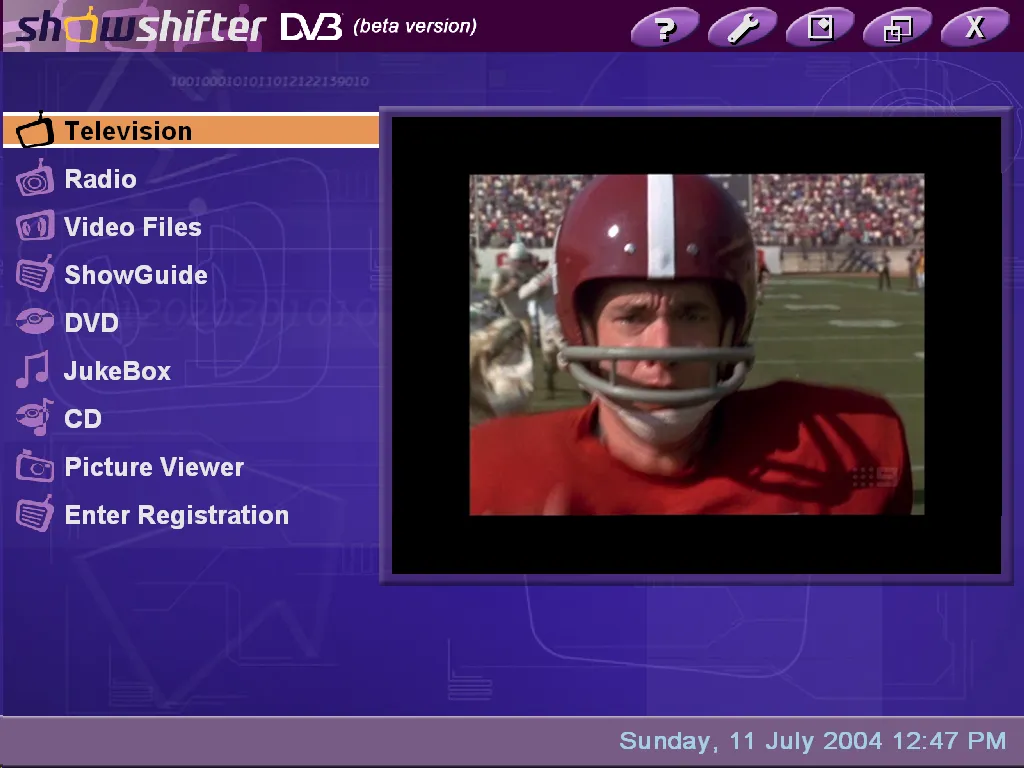
Showshifter DVB: lots of functionality in a visually appealing user interface suitable for TV resolutions
Showshifter is the only widely available commercial product which supports Windows-based digital-TV recording, time-shifting and playback, as well as working as a DVD/multimedia player, picture viewer and music jukebox. It also supports operation over a network and can be operated using a supported remote control.
Earlier versions of Showshifter only supported analogue TV tuner cards, but the new digital-capable version, Showshifter DVB, supports Technotrend/Hauppauge/DPANDA DVB-T PCI/USB tuners. It also supports for Nebula DigiTV, but oddly, “not in Australia.” A beta version (3.02.2595) is Windows BDA driver-aware, and we were able to successfully use it with Spectrum BDA drivers for the VisionPlus card.
EPG support is enabled through a utility called HMNXMLTV that can import XMLTV listings into its internal EPG called “ShowGuide.” It is extensible through plug-in modules and the user interface is skinnable.
The installation process was very user friendly and straightforward, and the channel tuning process found all available digital TV channels.
Showshifter has the most visually attractive and easy to use interface, with all functions in large font and easy to read at TV resolutions. The beta version appeared to have a few bugs and crashed at couple of times, however the local distributor, New Magic, said the software was in the process of being finalised for the Australian digital TV environment and by the time you read this the final version should be released in Australia.
Word count: 217
Contact: New Magic
Online: www.newmagic.com.au
Phone: 02 9528 4555
Price: To come
Verdict: 4/5
Pro: All-in-one HTPC interface, looks great, can be used across network, supports XMLTV EPG listings
Con: Limited hardware support. Crashed occasionally.
myHTPC
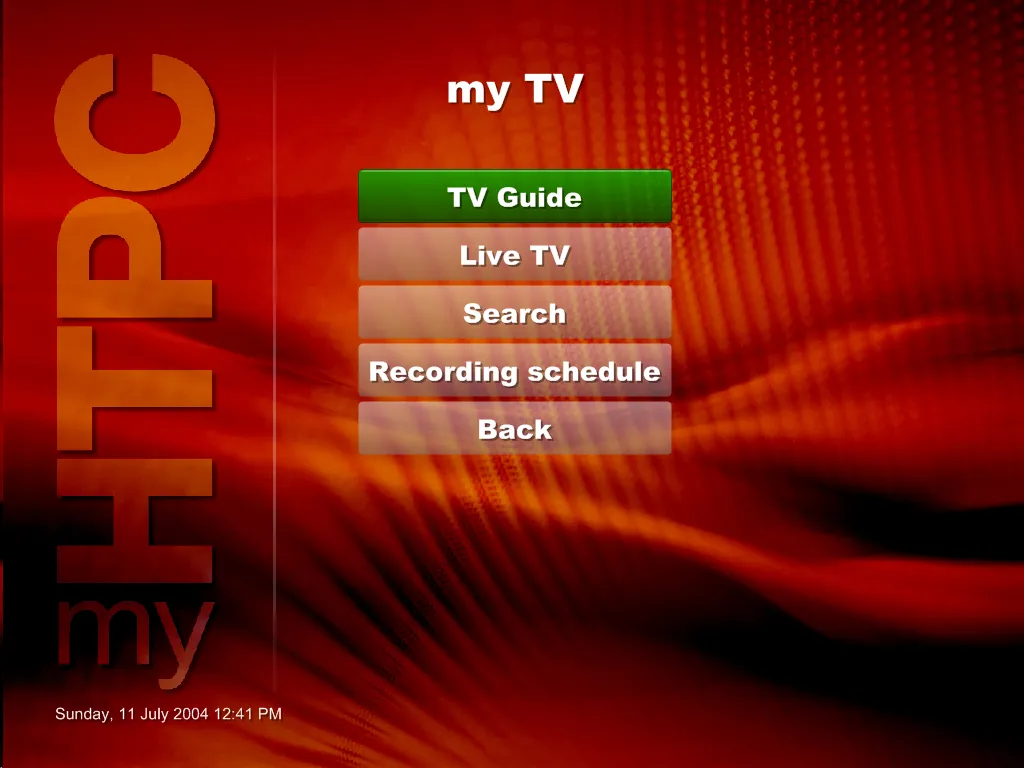
myHTPC: a very nice-looking front end with integrated EPG and TV scheduling capabilities
Want an attractive front-end for your HTPC that supports an Australian EPG and point-and-click scheduling of TV programmes?
myHTPC is a customisable, menu-driven HTPC front end that allows you to to launch external programs, browse pictures and large collections of almost any type of media stored on your computer. By itself, it’s not digital TV capable, but snap in the DABDig plug-in, and MyHTPC can control a Digital TV application of your choice.
DABDig supports a large number of both analog and digital TV tuner cards, including the TwinHan VisionPlus, Nebula DigiTV, Hauppauge Nova-T, DPANDA DVB-T and the AVerMedia AVerTV DVB-T. It also allows MyHTPC to read electronic program guides in the XMLTV file format. You can then schedule TV recordings, including recurring timeslots.
The author of myHTPC is currently working on releasing a commercial version called Meedio Essentials that should be released by the time you read this. There will also be version called Meedio TV that supports Live TV and DVR capabilities.
Integrating myHTPC with DABDig and your favourite DVR application is fairly complex (see the our workshop on page XX) but once installed, the software works seamlessly and the user interface is attractive and optimized for TV’s relatively low resolution.
Word count: 204
Contact: Meedio LLC
Online: www.meedio.com
Email: info@meedio.com
Price: Free (for personal, non-commercial use)
Verdict: 4.5
Pro: Full HTPC interface, designed to be extensible with plug-ins, including digital TV plugins, XMLTV EPGs, and more.
Con: Tricky to configure
DigitalWatch 0.701
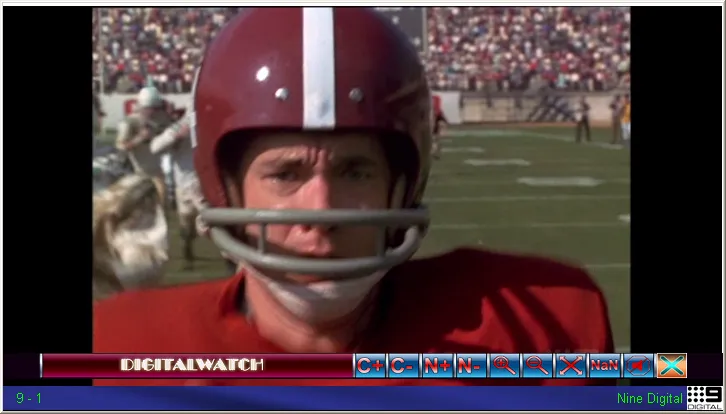
DigitalWatch: a minimalist user interface that is primarily oriented for watching TV
DigitalWatch is a free, open-source, digital TV viewing and recording application. The current version (0.701) only supports the TwinHan VisionPlus PCI card, but there is a BDA version (0.722) in beta.
The author says that DigitalWatch is “oriented towards watching rather than recording although it does have recording capabilities” and recommends another tool called DVB TV Web Scheduler (BDA version also in development) for timed recordings.
The installation process is fairly manual and very few instructions are provided. TV channel scanning is done using an external utility and then manually entered into the channels.ini configuration file. The web site says channel configuration files for “most capital cities” are supplied, but we did not find them in the installation package.
The biggest drawcard for DigitalWatch is probably the ability to pick and choose the audio and video decoders of your choice, which allows tinkerers to experiment to see which ones have the best quality and stability. It also supports a screen zoom feature, which is useful for watching widescreen programs on a 4x3 display, or watching 4x3 programs on a widescreen display.
Some of the features such as program name (‘now and next’) and channel strength/quality indicator didn’t work on the version tested.
The user interface is designed to appeal to users who want to watch TV without any screen clutter. Moving the mouse to the bottom of the frame will bring up a menu bar, but the software is designed to be best used through the keyboard or remote control.
Contact: Nate
Online: http://home.bigblue.net.au/
Email: nate@bigblue.net.au
Price: Free (open source)
Verdict: 2.5
Pro: Minimalist user interface, no clutter, fully user customizable and configurable
Con: No in-built playback of TV recordings
ProgDVB
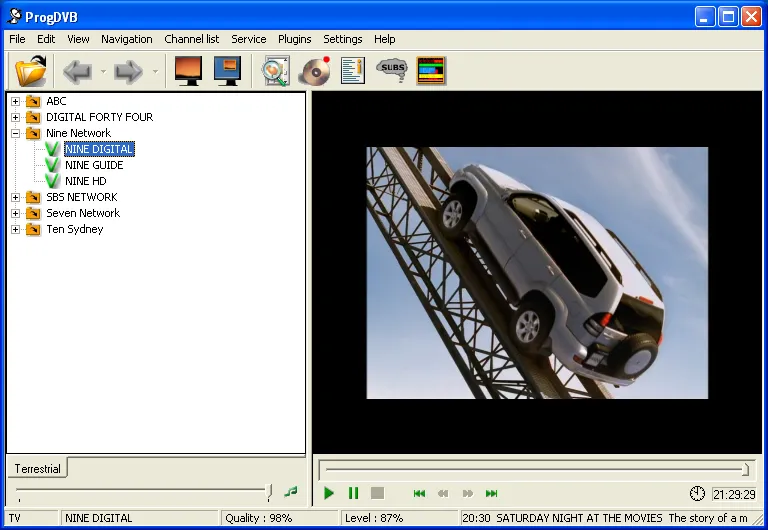
DigitalWatch: a minimalist user interface that is primarily oriented for watching TV
That caption is DigitalWatch’s, repeated word for word. It was wrong in my manuscript and the edit did not catch it. The picture is ProgDVB.
ProgDVB is a free but functional alternative to the bundled application that came with your tuner card. The current version (4.40.2 test) supports the TwinHan VisionPlus and Technotrend/Hauppauge/DPANDA cards, plus a number of other cards not sold in Australia. It supports both watching and recording digital TV, and is extensible through user-contributed plug-ins.
Installation was relatively easy, but the TV channel scanning function (Channel List | Channel Search | Search All Transponders) did not find any channels. However, if a scan is performed individually for each TV station frequency, the program managed to detect and lock in to all channels successfully. In addition, the software allows users to pick and choose various decoding filter configurations, which allows tinkerers to experiment to see which ones have the best quality and stability.
The EPG feature is limited to ‘now and next’ information that is broadcast with the digital TV transmission. There is an additional EPG plug-in available (EPG-plugin from Relict Marauder) but this does not appear to support the XMLTV file format most commonly used in Australia. ProgDVB appears to support multiple recording formats, but recommends PVA (“Packetized Audio and Video PES”).
The Teletext feature worked, but subtitles didn’t.
ProgDVB has a nice balance between features and usability. Even though the software is still under development, it shows a lot of promise and is worth considering as an alternative to the bundled application that came with your tuner card.
Contact: “Prog”
Online: http://www.progdvb.com
Email: prog@progdvb.com
Price: Free
Verdict: 3.5
Pro: Good user interface, supports teletext, user can choose TV recording format and decoding filters.
Con: Subtitles didn’t work, no EPG support for Australia, no BDA driver support.
Extra text – we won’t have room to include this
That heading is the editor’s, typed into the file above the boxout. Everything below it was cut. It is reproduced here because it is the only place the decision is recorded — and because the boxout began as the brief’s own questions to me, pasted into my first draft, and had only just finished becoming copy for readers when he cut it. An earlier version of this note claimed the boxout was mine from the start; the brief, which has since surfaced, says otherwise, and the account of the transformation is with the manuscript.
Boxout: What to look for
If you are looking at Digital TV software, you may want to consider the following:
EPG support – Does the software support Now and Next information? Does it support downloadable EPG listings for Australia? Can it import XMLTV format EPG listings?
Extensibility – Does it support plug-ins? What plug-ins are currently available? What other functionality does it support besides watching and recording TV?
Hardware support – Is the software supported on your card? If it isn’t, time to look elsewhere, or ask the company/author if they are planning support in the near future.
Installation – How easy/automated is the software installation process? Are the instructions easy to follow? Is the configuration done through a menu/wizard or do you need to edit configuration files?
HDTV – Does it support HDTV channels or only SDTV channels? Does it support Dolby Digital (AC3) audio streams?
Recording format – Does it support HDTV recordings? What format does it record to (PVA, transport stream, program stream) and can the format be converted to program stream for DVD burning? Does it have DVD burning capabilities?
Timeshifting – Can you pause Live TV? Can you schedule recordings? Using an EPG? Can it schedule recurring/repeating recordings? Is there an external/remote interface (API or web) for scheduling recordings?
TV channel scanning – Did the software tune Australian channels easily? Are there any pre-configured channel files for your location?
Usability – Is the software easy to use? Does it support a remote control? Does the user interface get in the way when you just want to watch TV? Is the user interface readable at TV resolutions?
Sources
- APC’s edit,
Digital TV Software v3.doc, 49 KB, at revision 28, last saved by Dan Warne at 05:32 UTC on the 11th of July 2004, which is half past three that afternoon in Sydney, under Mac Word 11 where the manuscript was Windows. Its creation stamp is identical to the manuscript’s. - My manuscript, the version I sent, with the two earlier drafts and the account of how the piece was assembled.
- The screenshots are the same four files the manuscript used, published as PNG with their pixels unchanged. The edit names the same pictures in the same places.
- The word counts quoted in the preface are measured from the text rather than read from the file. Word’s own counter reads 1,407 here against 2,107 for the manuscript, which matches neither measurement.
- Remote controls for your HTPC, the third piece of the same batch, which no edit of survives.