
Can you still read the files you made thirty years ago?
What it took to recover my own conference papers from Word 2.0 and PowerPoint 4.0, and what it taught me about who is actually keeping my archive readable.
I have been putting my old conference papers onto this website.
It seemed like a small job. I gave these talks, I wrote these papers, I still have the files. How hard could it be to publish them?
Quite hard, as it turns out.
What I was trying to do
In a directory called PAPERS I have the originals of everything I presented in the late eighties and early nineties. A thesis from 1987. A USENIX paper from 1991. A magazine article from 1990. Conference papers from AUUG’93, AUUG’94 and Oracle OpenWorld ’94.
They are .DOC files from Word, .PPT files from PowerPoint, and a set of directories holding HTML that I exported from them in 1998 so I could put them on the web of the day.
I wanted all of it on this site as proper articles. Readable, searchable, with the diagrams looking like diagrams rather than like fax transmissions.
The first problem: nothing can read them
I have Microsoft PowerPoint installed. It is a current version, part of a Microsoft 365 subscription that I pay for.
It cannot open my PowerPoint file.
The file is DCSATP.PPT. It is 295 KB. Its own metadata is perfectly legible and tells me it was made with PowerPoint 4.0, that it holds 42 slides, that it was created on 17 August 1994, printed on 28 August, and last saved on 5 September. It even records the conference session: Day 3, Session M13, 2 PM.
That last line is an agenda entry, and I was the one who stood up in that session and gave the talk. The file is the only thing left of it.
Microsoft wrote that file. Microsoft can no longer read it.
Word was more forgiving. macOS still ships a small utility called textutil that reads Word formats back to version 2.0, and it pulled the text out without complaint. So the words were recoverable. The pictures were not.
The second problem: the export is not the paper
I did have a fallback, or I thought I did. In 1998 I converted these papers to HTML with Microsoft FrontPage, and those files still open in any browser.
So why not just use those?
Because I had no idea what the conversion had done to them. So I asked for the 1998 HTML to be checked against the Word manuscript it came from, character by character.
The export turned out to be 99.7% faithful. That sounds like a pass. But the missing 0.3% was a word. In a list of Berkeley networking utilities, the paper reads ftp, telnet, rlogin. The HTML export reads ftp, rlogin. Somewhere in the conversion, telnet fell out, and it has been missing from that paper for twenty-eight years.
I would never have found it by reading. It reads perfectly well without telnet.
The comparison turned up something else I liked even more. The Word file numbers its headings with a field code rather than typing the numbers in, which means the manuscript contains no section numbers at all. So when the HTML export shows two consecutive sections both numbered 1.2, that is not me being careless in 1994. That is the converter. Thirty-two years later I can prove which of us made the mistake.
The export loses things quietly, and only the original can tell you what.
What actually reads a 1994 PowerPoint file
At this point Claude told me it could not be done. It had checked what was installed on my machine, reasoned from memory about the alternatives, and concluded that nothing could read the file.
I did not accept it, and asked it to go and look properly. Most of what it had assumed was wrong.
pandoc, which everyone reaches for first, cannot read binary.docor.pptat all. It can write PowerPoint, but it has no reader. It was never a candidate.- Aspose.Slides and Spire.Presentation, the serious commercial libraries, both start at PowerPoint 97. So does
python-pptx, which only handles the modern XML format. - Nothing on npm reads the binary format either.
There is exactly one piece of software that reads my file. It is called libmwaw, it is part of the Document Liberation Project, and its list of supported formats includes “PowerPoint Mac v1–v4 and Windows v2–v4, 95”.
It is free, it is open source, and it is maintained by volunteers. It is bundled inside LibreOffice, which is why LibreOffice opened my presentation in about four seconds after Microsoft had failed to.
The toolchain
I did not write any of this myself. Not the converters, not the comparison scripts, not the article you are reading. I prompted Claude Code and it did the work, which is the method I wrote about in AI-dō.
The part of that method this project leaned on was refusing to take the first answer. Everything above about libmwaw exists because I did not accept “it cannot be done”, and the research that followed took about ten minutes.
Once LibreOffice could read the deck, the rest was mechanical:
soffice --headless --convert-to svg deck.pptThat gave me all 42 slides as vector graphics: 3,281 drawn paths and 461 pieces of real, selectable text, with not a single pixel image among them. Everything that was ever in that presentation is still in there, thirty-two years later, as long as something can read the container.
The Word document held a second surprise. Buried in it were eleven Windows Metafiles, which is an old vector format. They are there because Word 2.0 cached a drawing of every embedded object so it could display the figure without launching PowerPoint to ask. Nothing on my machine reads Windows Metafile either, so I had Claude write a converter for it. That took an afternoon and four wrong pictures, each of which looked plausible enough to publish.
Three of the four figures in the AUUG’94 paper came out of those metafiles. The fourth was never an embedded object, so it had to come from the slide deck instead. All four are now vector graphics rather than the 480 pixel GIFs I made in 1998. Here is the first, out of the Word file:
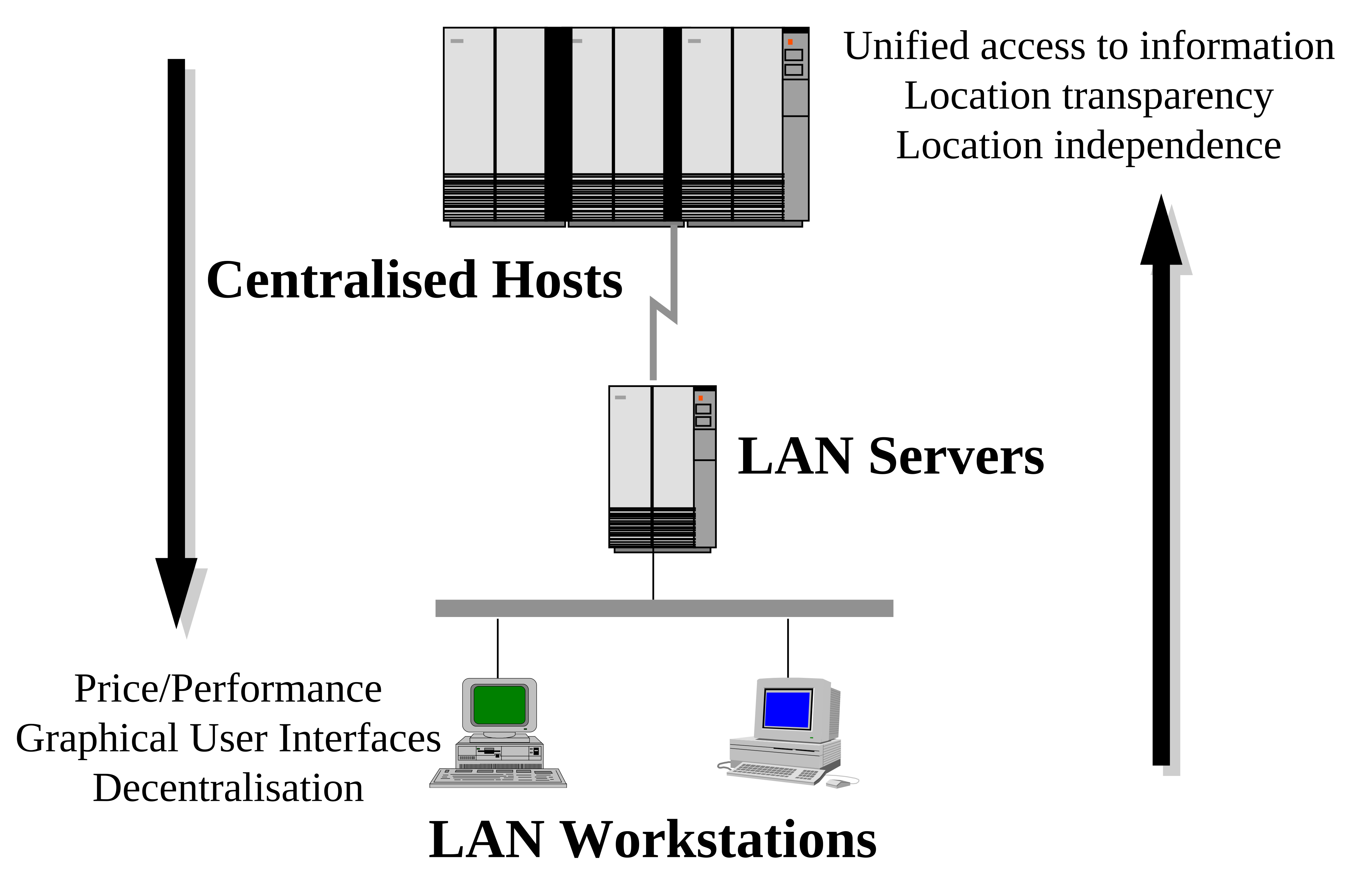
You can read the labels. In the 1998 version you mostly cannot.
Three versions of the same picture
The same diagram exists in three different colour schemes.
The version on the slides is in the presentation template’s pinks and purples, because that is what I showed on a projector. The version embedded in the Word document is greys and greens, because I recoloured it for print. The version in the 1998 HTML is a third scheme again, because by then I had revised the slides and re-exported.
None of these is wrong. But it means “the figure” is not one thing, and if you want the one the paper actually printed, you have to go to the document that printed it.
What I take from this
My papers survived. Every word of them. The paper is not the problem.
What did not survive is the ability to open them, and that loss is invisible until the day you need it. The file sits on the disk looking perfectly healthy. It is 295 KB. It has a name and a date. You find out it has been unreadable for years at the moment you double-click it, and nobody tells you before that.
Microsoft did not destroy my presentation. They stopped carrying the code that reads a format they invented, and from where they sit that is a reasonable decision. It is also the answer to how long a vendor will keep your files readable, which is: for as long as it suits them. The people who kept mine readable were volunteers who were never paid to.
I thought I had solved this once already. I converted these papers to HTML in 1998 believing I had future proofed them, and that HTML is now twenty-eight years old, made by a tool that no longer exists, quietly missing a word. Whatever I make this month will need the same suspicion in another twenty years. So try opening your own old files while you still have the software that made them.
For thirty years I have thought of my archive as a set of files. It is not. It is a set of files and the software that can read them, and only one of those two things was ever mine.
Sources
- libmwaw, the import library that reads PowerPoint Mac v1–v4 and Windows v2–v4 and 95, and the only thing that could read my deck.
- The Document Liberation Project, which maintains it and several other readers for abandoned formats.
- The papers themselves. AUUG’94 has the recovered figures. AUUG’93 and the Oracle OpenWorld ’94 revision are still carrying their 1998 GIFs, which is a job I have not done yet.